
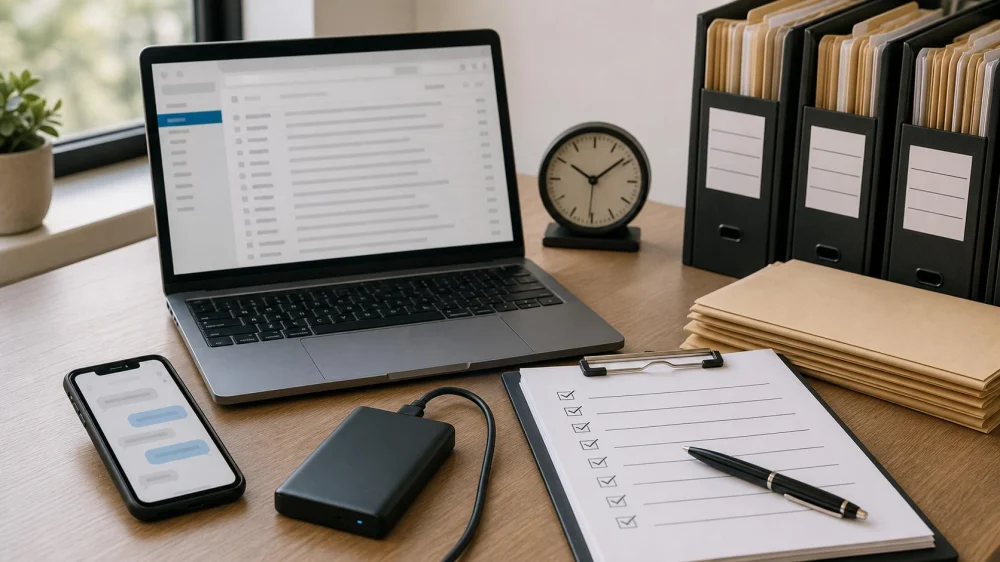
How to Preserve Digital Evidence After a Legal Dispute
On this page
- Quick answer
- Why early preservation matters
- First steps before collecting anything
- Collect common digital records carefully
- Organize without changing the originals
- Actions that can create legal or technical problems
- When to involve a lawyer or specialist
- Limits and official sources
- Frequently asked questions
- Conclusion and checklist
Quick answer
When a dispute may lead to a claim, investigation, or lawsuit, stop routine deletion of potentially relevant emails, messages, files, photos, recordings, and account data. Keep original devices and files intact, preserve surrounding context and metadata, document what you copied and when, and store working copies securely. Do not edit, annotate, secretly access another person's account, or rely only on screenshots. Ask a licensed lawyer promptly what your jurisdiction and case require.
Estrada Law Group / estrada law group
Los AngelesLos Angeles CountyCalifornia
205 S Broadway Ste 808, Los Angeles, CA 90012, USA
Why early preservation matters
Digital information can disappear through auto-delete settings, expiring links, device replacement, cloud synchronization, account closure, app updates, or ordinary employee offboarding. Waiting until a complaint is filed may be too late.
In federal civil litigation, discovery may require parties to provide documents and other information related to the case. The U.S. Courts overview of civil cases explains that discovery helps litigants assemble evidence and prepare for trial. The Federal Rules of Civil Procedure govern federal district-court civil proceedings; state rules and agency procedures can differ.
Preservation does not mean that every saved item will be admissible, discoverable, or helpful. It means avoiding preventable loss while a lawyer determines relevance, duties, privilege, privacy, and production scope.

Culver Legal / culver legal reviews
Los AngelesLos Angeles CountyCalifornia
5670 Wilshire Blvd #1370, Los Angeles, CA 90036, USA
First steps before collecting anything
- Write a neutral issue summary. Note what happened, key dates, people, accounts, devices, and systems without embellishment.
- Identify likely sources. Include phones, computers, email, messaging apps, cloud storage, social media, cameras, calendars, payment records, and business systems.
- Pause automatic loss. Where you have authority, suspend auto-delete, recycling, device wiping, retention cleanup, and destructive account changes for potentially relevant sources.
- Keep original hardware. Do not factory-reset, trade in, repair, or reassign a relevant device before receiving case-specific advice.
- Limit access. Preserve only information you lawfully control. Do not guess passwords, bypass permissions, or enter someone else's private account.
- Contact counsel early. Deadlines and preservation duties depend on the facts, forum, and governing law.
If you receive a subpoena, court order, preservation letter, litigation hold, or agency request, follow its deadline and scope and send it to counsel immediately. Do not treat this general checklist as an interpretation of that document.
Collect common digital records carefully
Preserve complete messages with sender, recipient, date, time, subject, body, attachments, and thread context. Printing to PDF may be convenient for review but may omit headers or metadata, so retain the native mailbox data or original message files when available.
Text messages and chat
Capture the full relevant conversation, participant identity, visible dates and times, and attachments. A cropped screenshot can omit context. Keep the original device and use a reliable export method supported by the service or advised by counsel.
Photos, video, and audio
Keep the original files rather than only edited, compressed, or social-media versions. Preserve filenames, dates, location information where lawfully present, and the device that created them. Do not enhance or trim the only copy.
Web and social-media content
Save the URL, account name, visible date and time, full-page context, and associated media. Content can change quickly, so record when and how it was captured. Do not impersonate another person, evade access controls, or direct others to do so.
Business and cloud systems
Coordinate with authorized IT staff, records personnel, and counsel. A simple download may miss audit logs, versions, linked files, permissions, database relationships, or server-side records. Avoid broad unsupervised collection that exposes unrelated confidential information.
Organize without changing the originals
- Create a read-only master set and separate working copies for review.
- Use consistent folders by source and date; do not rename the only original files.
- Maintain a collection log recording the source, custodian, date, method, collector, and destination.
- Record transfers between people or storage locations.
- Use access controls, encryption, and backups appropriate to the sensitivity of the information.
- Keep privileged attorney communications separated and identify them for counsel rather than forwarding them broadly.
Technical specialists may calculate file hashes or create forensic images when authenticity, deleted data, system logs, or device condition matters. Do not attempt an advanced forensic process without the tools and experience to avoid altering data.
Actions that can create legal or technical problems
- Deleting unfavorable material or asking someone else to delete it
- Editing original files, changing dates, or adding notes inside them
- Continuing a disappearing-message or short-retention setting without advice
- Posting about the dispute or contacting witnesses through public comments
- Making a secret recording without checking applicable consent and privacy laws
- Accessing an employer, former partner, customer, or family member's account without permission
- Installing recovery or “cleaner” software on a relevant device
- Forwarding sensitive records to a personal email account that lacks appropriate security
- Assuming a screenshot, cloud link, or printed copy is a complete backup
Preservation should not become surveillance, retaliation, or unauthorized access. A lawyer can help define a lawful, proportionate plan.
When to involve a lawyer or specialist
Seek legal advice promptly when a claim has been threatened, a deadline is running, evidence may disappear, a device belongs to an employer or another person, regulated data is involved, or you receive formal legal process. Criminal exposure, workplace investigations, domestic disputes, health records, trade secrets, and cross-border data call for especially careful handling.
Ask prospective counsel:
- What information must be preserved, and from what date range?
- Who are the likely custodians and systems?
- Should any devices be taken out of use?
- What collection method preserves necessary metadata?
- How should privileged, personal, or regulated information be handled?
- Is a forensic examiner or e-discovery provider needed?
- What can continue to be deleted under ordinary policy?
Limits and official sources
This article provides general U.S. educational information, not legal advice, a litigation hold, or a complete evidence protocol. Preservation duties and sanctions vary by federal, state, tribal, and local law, the type of proceeding, court orders, and the facts. Evidence that is preserved may still be privileged, private, inadmissible, or outside permissible discovery.
For federal civil matters, review the current Federal Rules of Civil Procedure, the assigned court's local rules and orders, and advice from counsel. The U.S. Courts notes that federal civil rules were last amended in 2025 as of this article's July 2026 review; always check the current official version.
Frequently asked questions
Are screenshots enough to preserve text messages?
Not necessarily. Screenshots may omit participants, timestamps, attachments, metadata, or surrounding context. Keep the original device and account data when lawful, and ask counsel about an appropriate export.
Should I delete unrelated personal information before sharing a device?
Do not alter the device on your own once preservation is a concern. Tell counsel about unrelated sensitive data so collection and review can be scoped appropriately.
Can I record a phone call about the dispute?
Recording-consent laws vary, and more than one jurisdiction may apply. Get case-specific legal advice before recording; do not assume your state's rule is the only one that matters.
What if an app deletes messages automatically?
Where you have lawful authority, preserve existing content and disable destructive settings without altering other evidence. Document what changed and when, and obtain prompt technical and legal guidance.
Does preserving evidence mean I must send it to the other side?
No. Preservation and production are different questions. A lawyer should determine what must be disclosed, when, in what form, and whether privilege or a protective order applies.
Conclusion and checklist
Stop preventable deletion, identify lawful sources, keep originals intact, preserve context, document collection, secure the data, and contact counsel early. Avoid editing, unauthorized access, public discussion, and improvised forensic work. A narrow, documented preservation plan is more defensible and useful than an uncontrolled pile of screenshots.





 Nelson & Nuñez, PC5.0 (33 reviews)
 Mondry & Mondry, Attorneys at Law4.0 (270 reviews)
 Edivette Lopez-Benn P.C.5.0 (29 reviews)
 Geffre Law, P.C.5.0 (25 reviews)
 Wugman & Wugman, PC5.0 (107 reviews)
 Ballen Arthur E5.0 (1 reviews)
 What to Know Legally About Employee Stock Purchase Plans (ESPP)
 Your Rights During a Police Stop: Understanding Legal Protections
 How to Expunge a Criminal Record: A Step-by-Step Guide
 What to Know Legally About Succession Planning for Family-Owned Businesses
 How to Legally Respond to a Bankruptcy Trustee’s Claim Against You
 How to Legally Address Contesting a Will That Was Signed Under Duress