
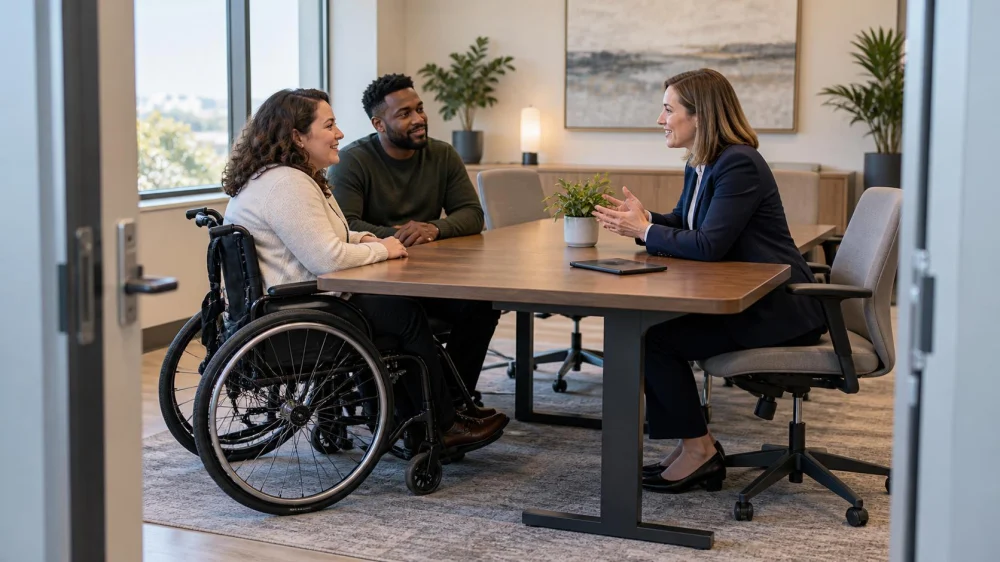
Law Office Accessibility: Plan Communication and Entry
On this page
Quick answer
Before a legal consultation, describe the access or communication barrier in practical terms and request what will make the meeting effective: an accessible route, suitable room, extra time, captioning, an interpreter, large print, or accessible electronic documents. Confirm who arranges each aid, how confidentiality is protected, and what backup applies if technology, transport, or the planned room fails.
Estrada Law Group / estrada law group
Los AngelesLos Angeles CountyCalifornia
205 S Broadway Ste 808, Los Angeles, CA 90012, USA
Match access to the communication task
An accessible legal meeting allows the client to enter, participate, understand information, ask questions, review documents, and make decisions with comparable effectiveness. The right solution depends on the person's usual communication method and the nature, length, complexity, and context of the conversation.
This checklist is for disabled clients, companions, and US law offices planning a consultation. It is general information, not a legal conclusion about a specific firm's obligations. Federal, state, local, court, employment, and professional rules may overlap.

Culver Legal / culver legal reviews
Los AngelesLos Angeles CountyCalifornia
5670 Wilshire Blvd #1370, Los Angeles, CA 90036, USA
Practical checklist
- Parking or drop-off, curb route, entrance, doors, lift, restroom, meeting room, and emergency exit.
- Preferred communication method and any interpreter, captioning, assistive listening, reader, or speech support.
- Large-print, Braille, audio, tagged PDF, editable text, or screen-reader-compatible document format.
- Time needed to request, test, and provide the aid without excessive delay.
- Client consent for companions, support people, recording, document sharing, and follow-up contacts.
- Privacy of interpretation, remote platforms, waiting areas, visible screens, and confidential documents.
- Backup room, phone, video, relay, transport, or rescheduling plan when the primary method fails.
Step-by-step plan
- Tell the office what communication or physical barrier exists and which method normally works for you.
- Describe the meeting purpose and likely document volume so the office can assess complexity and timing.
- Ask one named person to confirm the aid, accessible route, room, technology test, and arrival process.
- Request accessible documents early enough to review them before a decision or deadline, and verify that files work with your tools.
- At the meeting, state when communication is not effective and pause before agreeing to something you could not access.
- Confirm advice, decisions, responsibilities, deadlines, and the format of the follow-up record before leaving.
Keep the accommodation request, response, meeting date, documents supplied, technical tests, access problems, agreed alternatives, and follow-up. Share disability or health details only to the extent useful for the request and legal representation.
Limits and important notes
Do not assume a family member should interpret a complex or confidential discussion, and do not accept an inaccessible document as understood. Emergency court or filing deadlines may require immediate contact with the lawyer, court, or qualified local assistance while access is being resolved.
Escalate unresolved access through the firm's responsible partner or accommodation contact and preserve the timeline. For legal rights or urgent deadlines, use a qualified attorney, court accessibility office, bar referral, disability-rights organization, or government enforcement route appropriate to the facts.
Frequently asked questions
How early should I request an aid?
Give reasonable notice when possible, but ask even if the need arises at the last minute. Confirm the practical response in writing.
Must I bring my own interpreter?
Do not assume so. Ask the office to evaluate effective communication and who arranges and pays under the applicable rules.
Can a support person join the meeting?
Usually the client and lawyer should discuss consent, confidentiality, conflicts, privilege, and the person's role before sharing information.
What makes an electronic document accessible?
It must work with the client's actual technology and method, such as screen-reader-friendly text or another usable format, not merely be digital.
What if the building is inaccessible?
Ask about an accessible room, another location, remote meeting, home visit, or other effective alternative without losing urgent advice.
Sources and evidence
Evidence note: the US Department of Justice ADA.gov guidance on Effective Communication says solutions should reflect the nature, length, complexity, context, and person's normal method; it specifically gives accessible electronic legal documents as an example. Verify current law for the facts.
Conclusion and next steps
Describe the barrier and preferred method, verify the complete route and communication setup, test accessible documents, and name a backup. During the meeting, pause when access fails and leave with advice, decisions, deadlines, and responsibilities in a usable format.




 Law Offices of Jessie Serna4.0 (6 reviews)
 Adams, Cassese & Papp L.L.C.0.0 (0 reviews)
 Greenwood Law4.0 (20 reviews)
 Davis & Associates Attorneys At Law4.0 (40 reviews)
 Maline Law Group3.0 (41 reviews)
 Marc A. Rapaport4.0 (19 reviews)
 Legal Tips for Buying Your First Rental Property With Limited Liability
 What to Know Legally About Sharing Economy Platforms and Host Liability
 Law Office Accessibility: Plan Communication and Entry
 How to Legally Navigate Hidden Debt When Buying a Business
 Law Made Simple: How to Legally Change Your Name
 Your Rights During a Police Stop: What You Need to Know in 2024